Connect by token in one step
Front Desk → Accounts → Add account → Telegram. Paste the token from @BotFather, press Connect and create a chat reply bot.
Connection guideCustomers write to your bot or straight to your personal Telegram. The AI answers in seconds, keeps the conversation on your script, collects contacts and calls a person when it is needed. You reply as a single operator for free and pay only for the AI's tokens.

A public bot from @BotFather, your personal chats via Telegram Business, or both at once. Both live in the same inbox.

Create a bot in a minute, paste its token into BotB2B and the AI starts replying to everyone who writes to the bot. Best for a company account, ads and links from your website.

Customers write to you personally? Attach your bot to your personal chats with Telegram Premium and the AI replies on your behalf: greets, consults by your script and collects contacts. An official Telegram feature, no risk for the account.
Real screens from the platform: connection, conversations and your team's phone.

Front Desk → Accounts → Add account → Telegram. Paste the token from @BotFather, press Connect and create a chat reply bot.
Connection guide
Turn on Secretary Mode for the bot in BotFather, add it in Settings → Telegram Business → Chatbots and pick the chats it may handle.
Telegram Business guide
Bot and personal chats land in Chats: the AI's replies, the lead being formed, the toggle to answer yourself and the assignee.
Bot settings guide
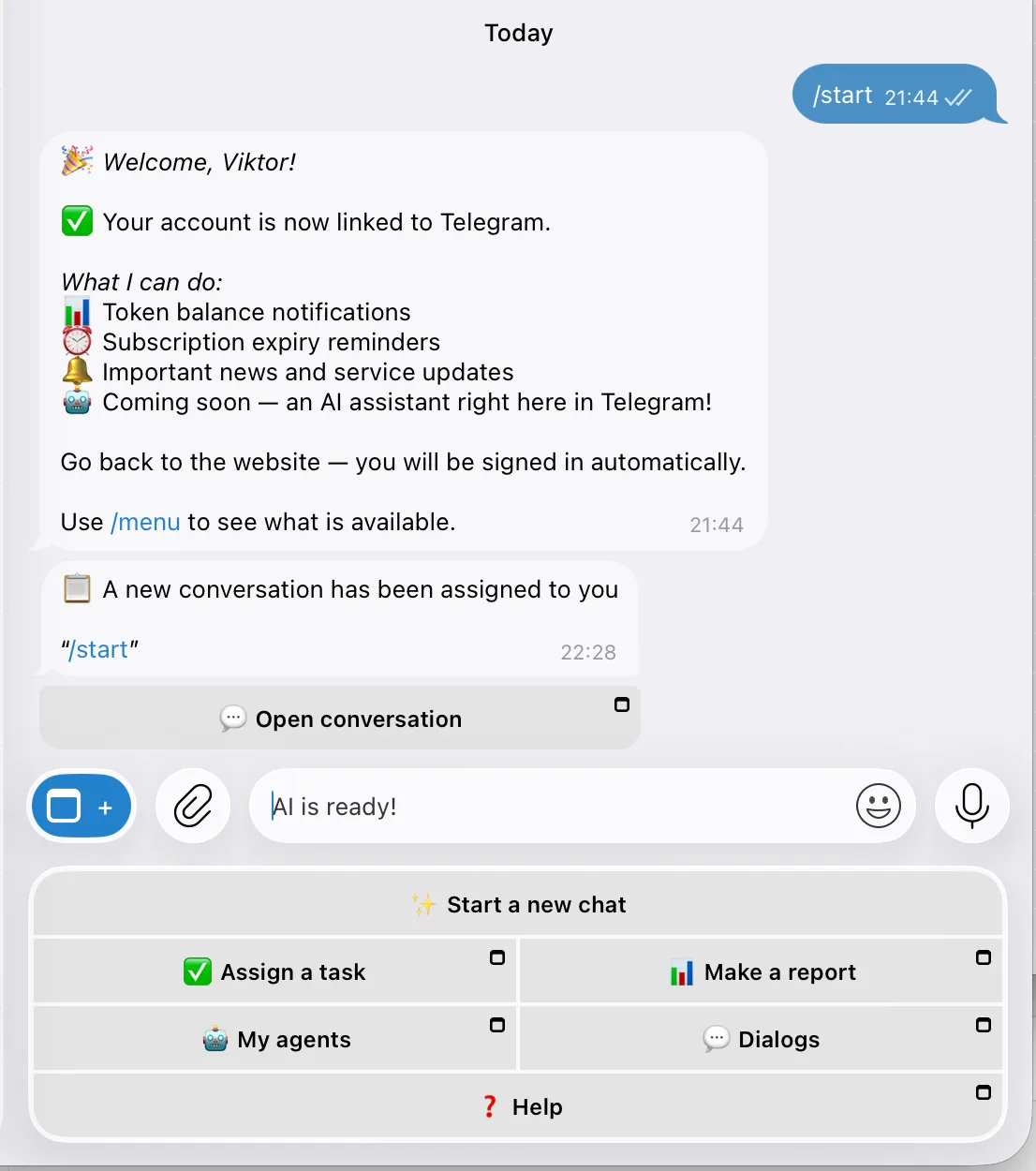
When the bot asks for help, the person on duty gets an alert with an Open conversation button and answers in the mini app without opening the site.
Handoff and replies guideFive minutes from sign-up to the first reply. No code, no payment up front.
By email or in one tap with Telegram. No card or payment required.
Platform overviewSend /newbot, choose a name and a username, copy the API token.
BotFather guidePaste the token in Front Desk → Accounts. For personal chats, add the bot in Telegram Business.
Connection guideAnswer the Smart setup questions or write a prompt, assign the bot to the account and send it /start.
Bot settings guideGet a token from @BotFather and paste it into BotB2B:
/newbot
→ My Awesome Sales Bot
→ my_awesome_sales_bot
✓ Done! Use this token to access the HTTP API:
1234567890:ABCdefGHIJKlmNOPqrsTUVwxYZ123456789Replies from your knowledge base, collects leads and knows when to call a person.
The answer delay is yours to set, from instant to a few minutes, so the bot collects a thought written in several messages and does not look like a bot.
Describe the business in your own words or write a full prompt: what the bot knows, when it creates a lead, when it asks for help and when the conversation is over.
Price lists, documents and pages from your site: the bot answers strictly from your data and does not invent what you did not write.
Customer voice messages are transcribed and answered like text.
An insult, a request for a manager, a big discount: the bot pauses, marks the chat and the person on duty gets an alert in Telegram.
Contacts become leads with a summary of the conversation, delivered to a Telegram group, email, the built-in CRM or amoCRM.
Handoff alerts and replies from the phone, without opening the site.

Connecting Telegram bots, Telegram Business, and chatting with customers as a single operator are free forever. Pay for tokens when you turn on AI replies, and for the Team add-on if you need extra members with scheduling.
Free forever
Pay-as-you-go
Start free: connect a Telegram bot or Telegram Business and reply to customers yourself as a single operator. Turn on AI replies later — pay only for tokens you actually consume. Bring in team members with individual schedules through the paid Team add-on; no hidden subscriptions or auto-charges.
Small business, support, sales, and online education — anywhere customers reach out via Telegram.
Customers write to your personal Telegram. Attach the bot through Telegram Business and let the AI answer routine questions while you work.
The bot handles common questions 24/7 and hands complex requests to the person on duty by schedule.
A bot from ads and your website qualifies leads, collects contacts and passes hot ones to a manager with a summary.
Answers questions about programs, prices and schedules; captures applications and creates deals in the CRM.
Every step with real screenshots, from BotFather to replying from your phone.
Can't find the answer? Reach out to support.